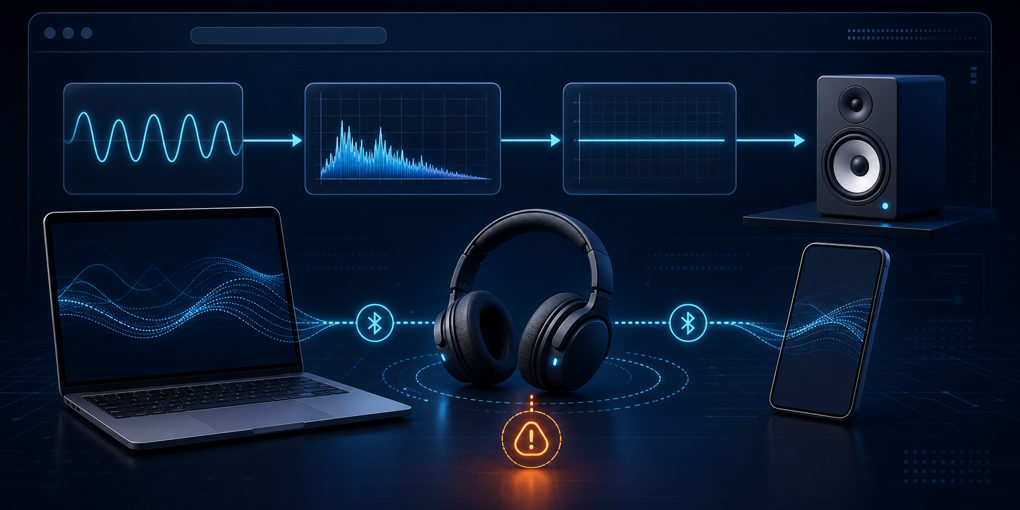
The Silent WebAudio Fingerprint That Hijacked Bluetooth Multipoint
A shopping tab should not be able to interrupt music playing from another device. Yet that was the clue that exposed a surprisingly broad browser fingerprint.
The setup was ordinary: multipoint Bluetooth headphones connected to a PC and a phone. The headphones normally favored the PC while it had active audio, then returned to the phone when the computer went quiet. Opening the AliExpress home page in Firefox or Chrome changed that behavior. After several seconds, phone playback stopped. Closing the tab restored it immediately. Muting the tab, the browser, or Windows did not.
There was no visible player, no audible sound, and no conventional media session. The page had created a live Web Audio graph instead.
Two heavily obfuscated scripts under Alibaba’s AWSC anti-abuse infrastructure instantiated separate AudioContext objects. Each generated a known waveform, inspected the processed result, reduced the final gain to zero, and still connected the graph to AudioContext.destination. The test was inaudible, but the destination connection kept the audio pipeline active strongly enough to affect Bluetooth routing on the investigator’s system.
That side effect turned a hidden measurement into something a person could notice. It also provides a useful case study in browser fingerprinting: one signal rarely identifies a device, but many weak and correlated signals can become a durable risk score or identifier.
The missing media element was the first clue
When a page appears to play audio, the obvious places to look are HTML media elements and media requests. The initial inspection checked for:
<audio>and<video>elements;- calls to
HTMLMediaElement.play(); - active Media Session state;
- media network requests;
- media inside embedded frames.
None explained the behavior. That matters because the Web Audio API does not require an <audio> element. It gives JavaScript a graph of processing nodes: sources create or ingest signals, transformation nodes modify them, analyzers read them, and a destination sends the result toward an output device.
The symptom also arrived after a delay. That suggested code initialized after page load rather than a player embedded in the initial document.
The useful debugging move was to instrument constructors and graph connections before the site scripts ran. Wrapping window.AudioContext revealed when a context was created and captured a stack trace. Wrapping AudioNode.prototype.connect showed when nodes were attached to a destination. The capture found two running contexts and traced them to versioned script families named collina.js and fireyejs.js.
This method is more general than the incident. If a page changes a device-level behavior without leaving an obvious DOM element, instrument the capability boundary rather than searching only the document tree. The DOM tells us what elements exist. Constructor and method hooks tell us which platform APIs execute.
The graph was silent but not inactive
The observed graph had this basic shape:
sawtooth oscillator
  → AnalyserNode
  → ScriptProcessorNode
  → GainNode (gain = 0)
  → AudioContext.destination
The oscillator supplies a controlled input. The analyzer exposes frequency-domain measurements after the browser’s digital signal-processing implementation has handled that input. The script processor lets JavaScript inspect samples during processing. A zero-gain node removes audible amplitude at the end.
The final connection is the important detail. AudioContext.destination represents the context’s audio output. Turning the gain down answers “what amplitude reaches the listener?” It does not necessarily answer “does the browser and operating system still consider this graph part of an active output route?”
On the reported Firefox/Chrome and Windows setup, the route remained active. The multipoint headphones therefore continued treating the PC as the active source instead of switching cleanly back to the phone. The page was silent in acoustic terms and active in resource and routing terms.
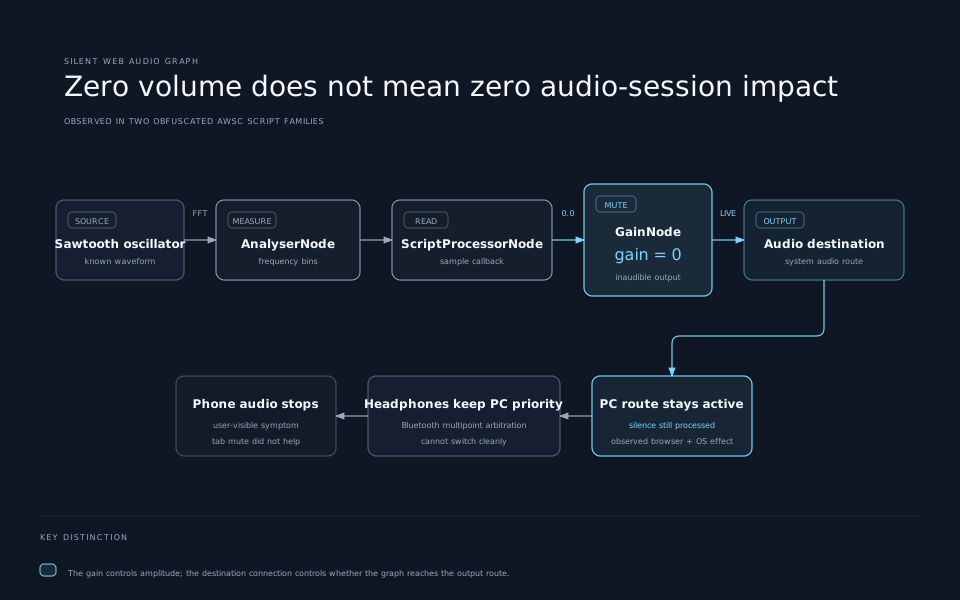
This distinction also explains why tab mute was a poor remedy in this case. A browser’s mute control is designed to prevent sound from reaching the listener. It is not a universal promise that every audio-processing graph will be suspended, destroyed, or disconnected from the platform’s audio machinery. The exact behavior varies across browsers and operating systems, so the hardware effect should be treated as a reproduced observation, not a guarantee for every device.
How an audio computation becomes a fingerprint
Running the same nominal signal through two machines does not always produce identical numbers. Browser version, operating system audio libraries, CPU architecture, floating-point choices, sample-rate conversion, and implementation details can introduce tiny differences into the output.
Those differences are normally inaudible. A script does not need to play the samples for a person; it can hash analyzer output or other computed values. The resulting value may separate classes of browser and device.
The Web Audio specification’s privacy section explicitly recognizes this surface. It notes that sample rates, channel counts, analyzer timing, latency, DSP architecture, resampling, rounding, compiler choices, and CPU architecture can contribute fingerprinting information. This is not a novel abuse of an undocumented trick. It is a known consequence of exposing detailed local computation to web pages.
Audio is not a magic serial number. A 2022 study of 2,093 users found only 95 distinct audio fingerprints across its tested vectors. The useful result was additive: including Web Audio measurements increased entropy by 9.6 percent compared with Canvas fingerprinting alone. In other words, audio becomes stronger when joined with other observations.
That is exactly what the inspected scripts appeared to do.
The larger bundle matters more than the oscillator
The script analysis found checks spanning several browser surfaces:
- Canvas rendering and pixel extraction;
- WebGL renderer details, extensions, and shader precision;
- oscillator and analyzer output from Web Audio;
- viewport, screen size, and device-pixel ratio;
- hardware concurrency and reported device memory;
- installed plugins and supported media formats;
- WebRTC behavior and performance timing;
- mouse, touch, focus, and scroll activity;
- motion and orientation signals;
- properties commonly associated with automation.
It also found code that serialized and encrypted results before sending telemetry with fetch() or sendBeacon().
These signals answer different questions. Graphics output reveals properties of rendering stacks. Audio exposes another computation stack. Screen and hardware values describe the environment. Interaction timing helps distinguish a person from scripted control. Automation checks look for inconsistencies created by headless browsers or spoofing tools.
One field may be shared by millions of users. A particular combination can be much rarer. More importantly for anti-fraud systems, the bundle can expose contradictions. A client that claims to be an ordinary phone while presenting desktop graphics behavior, impossible touch patterns, and automation artifacts is harder to trust.
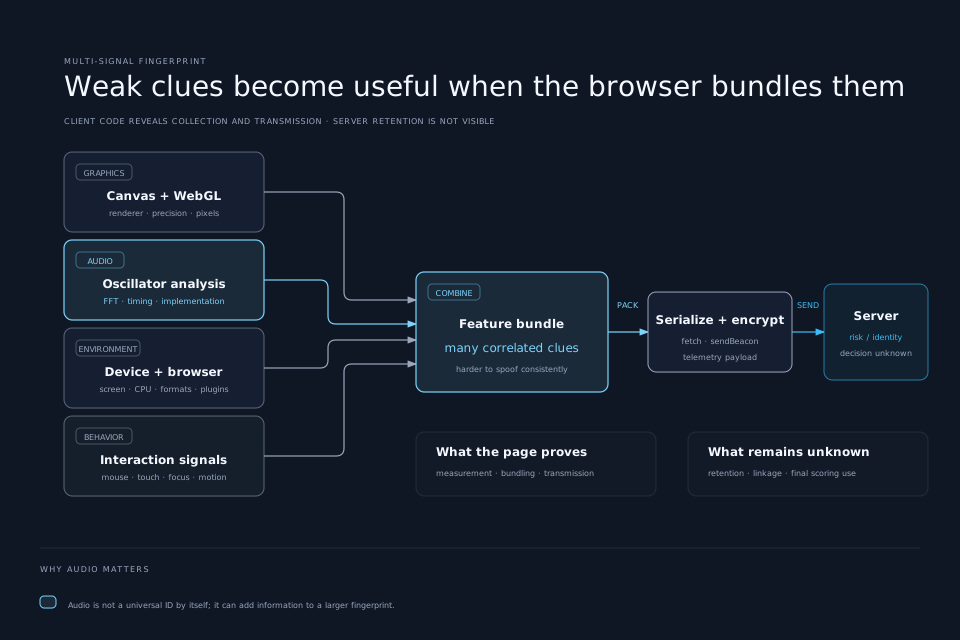
There is an evidence boundary here. Client-side code demonstrates collection, bundling, encryption, and transmission. It does not reveal the server’s final decision, retention period, whether values are linked across Alibaba properties, or whether a persistent identifier is stored. The data could feed bot detection, account-takeover defense, payment fraud scoring, coupon-abuse controls, user tracking, or several purposes at once. Responsible analysis should separate visible behavior from server-side inference.
Why a marketplace wants this data
Large marketplaces face adversaries that cookies alone cannot describe reliably:
- scrapers rotate profiles and clear storage;
- account attackers reuse stolen credentials across devices;
- fake accounts abuse welcome discounts and coupons;
- bots compete for scarce inventory;
- automated reviews and seller manipulation distort trust signals;
- payment fraud requires decisions before a transaction completes.
A cookie is easy to delete, copy, or replace. A composite fingerprint is harder to change coherently because its inputs come from many parts of the browser and machine. Interaction telemetry can also let a service reduce CAPTCHA frequency for traffic that looks ordinary.
That makes the anti-abuse motivation understandable. It does not make every implementation proportionate.
The measurement ran on a general shopping homepage before a login or payment step. It touched graphics, audio, WebRTC, hardware, motion, and behavior surfaces without a visible explanation. The bundles were deliberately difficult to inspect. Most importantly, the audio test escaped its intended abstraction and changed how external hardware behaved.
Security systems often create this tension. A detector loses value when attackers know every feature, but invisibility also removes the feedback that tells normal users why their device is behaving strangely. The more invasive the measurement and the wider its execution scope, the stronger the case for minimization, short lifetimes, sensitive-step activation, and clear controls.
The browser also owns part of the problem
Web Audio is a valuable platform capability. It supports synthesizers, games, accessibility tools, conferencing effects, visualization, music production, and low-latency interactive sound. Requiring a permission prompt for every AudioContext would make many legitimate applications unpleasant.
At the same time, permissionless readback creates fingerprinting surface. Browsers have several possible responses, each with trade-offs:
- Reduce precision. Quantize timing, latency, or analyzer results so implementation differences reveal less.
- Add stable noise. Safari’s advanced fingerprinting protections perturb Canvas, WebGL, and Web Audio readback. For audio buffers, the noise is designed to make small OS-level differences harder to recover without visibly harming legitimate output.
- Partition or standardize results. Make more users produce the same values, reducing uniqueness.
- Detect suspicious combinations. A hidden oscillator, analyzer readback, zero gain, and destination connection may deserve different treatment from an interactive music application.
- Expose activity honestly. A tab or site indicator could show that a live audio graph reaches an output route even when its current samples are silent.
- Suspend unnecessary graphs. Browsers could become more aggressive when an inaudible background context remains connected without recent user interaction.
No single technique solves fingerprinting. Returning random values can make a privacy-conscious browser more distinctive if the randomness itself has a recognizable pattern. Disabling whole APIs breaks real applications. Permission prompts become meaningless when every site asks. Detection rules can be evaded and may punish unusual legitimate software.
The useful goal is to lower entropy while preserving common applications, then make resource ownership visible when a page affects the system outside its tab.
A practical way to investigate similar symptoms
If a web page changes Bluetooth routing, media controls, CPU load, battery drain, or other device state, use a controlled comparison:
- Reproduce the symptom with one tab and a known browser profile.
- Note whether closing, muting, or backgrounding the tab changes it.
- Check conventional media elements, media sessions, frames, and requests.
- Instrument
AudioContext,OfflineAudioContext,AudioNode.connect, and context state changes before reloading. - Capture stack traces and map them to script URLs.
- Block one script family at a time and repeat the same observation window.
- Record the browser, version, operating system, and audio device because routing behavior is platform-specific.
- Keep collection evidence separate from claims about server use.
The author tested narrowly scoped uBlock Origin rules that blocked only the two observed script families when loaded by AliExpress:
||assets.aliexpress-media.com/g/AWSC/uab/*/collina.js$script,domain=aliexpress.com
||assets.aliexpress-media.com/g/AWSC/fireyejs/*/fireyejs.js$script,domain=aliexpress.com
After applying the rules and reopening existing tabs, the hidden contexts no longer appeared in the control capture and the shopping pages still rendered. This is a tactical mitigation, not a permanent specification. Versioned paths can change, other domains may be used, and blocking anti-abuse code may produce extra CAPTCHAs or interfere with login and checkout.
The rules are appropriately narrow. Broadly disabling Web Audio or all scripts creates more breakage and makes it harder to understand which component caused the symptom. uBlock Origin’s static filter syntax supports both resource-type and domain restrictions, which is why the filters can target script requests only in the relevant first-party context.
Firefox users who want broader protection should start with the browser’s supported Fingerprinting Protection controls. Mozilla recommends those protections for most users and treats the stronger privacy.resistFingerprinting preferences as advanced options that can break sites. Safari’s advanced protection takes another route by injecting carefully designed noise into several readback APIs.
The real lesson is resource visibility
The most interesting part of this incident is not that a company measured an oscillator. Browser fingerprinting through audio has been documented for years. The revealing part is that a supposedly silent computation crossed the boundary into physical device behavior.
The page considered the graph silent because its gain was zero. The browser may have considered it silent because no audible samples reached the user. The operating system and headphones still saw enough activity to keep one route in control. Each layer used a different definition of “nothing is playing.”
That mismatch is where hidden costs accumulate: battery use without a visible task, hardware ownership without an indicator, telemetry without a clear purpose, and privacy risk assembled from individually ordinary APIs.
Good platform design should make these boundaries harder to cross invisibly. Good site engineering should minimize measurements, scope them to sensitive actions, disconnect resources promptly, and test effects beyond the browser window. Good investigation starts with the user’s strange symptom and follows it down through every layer until “silent” has one defensible meaning.
Sources and further reading
- AliExpress webpage keeping multipoint Bluetooth headphones active with WebAudio fingerprinting, the original capture, script paths, graph analysis, and mitigation test.
- Hacker News discussion, including reports of audio indicators, thermals, and similar platform behavior.
- Web Audio API privacy and security considerations, the specification’s inventory of fingerprintable audio characteristics.
- Your Speaker or My Snooper?, the 2022 measurement study of Web Audio fingerprint diversity and additive entropy.
- Private Browsing 2.0, WebKit’s explanation of noise injection for Canvas, WebGL, and Web Audio readback.
- Resist Fingerprinting, Mozilla’s guidance on standard and advanced fingerprinting defenses.