Chrome Prompt API: Practical On-Device AI in the Browser
Browser AI is finally crossing from demos into product work.
Chrome’s Prompt API puts Gemini Nano directly inside the browser runtime, which means a web app or extension can run text generation tasks on the user’s machine instead of sending each request to a remote API. The result is a different engineering tradeoff: lower latency after setup, better privacy boundaries for local content, and no per-token cloud bill for local on-device requests. At the same time, you inherit new constraints around hardware, model download, and rollout maturity.
This post breaks down what the Prompt API actually gives you, where teams get surprised, and how to decide when built-in browser AI is the right tool.
What the Prompt API Is
The Prompt API is part of Chrome’s built-in AI stack. In practice, it exposes a LanguageModel interface in the browser and routes prompts to Gemini Nano running on-device.
That gives you a local LLM session you can create, prompt, stream from, and tune with sampling options, all from normal JavaScript.
The main design goal is simple: let the browser host useful language tasks near the user and near the page content, instead of forcing everything through a remote inference service.
Why This Matters for Product Teams
Most teams look at browser-side AI and immediately think about cost savings. That matters, but it is not the biggest change.
The bigger shift is product architecture:
- You can classify or transform user content locally before any server call.
- You can keep sensitive page context on the device for first-pass processing.
- You can design offline-tolerant AI features once the model is present.
- You can reduce UX friction for short interactions because responses can start quickly with streaming.
A good mental model is to treat Prompt API as a local coprocessor. Use it for near-user decisions and lightweight generation, then escalate to cloud models only when the task needs larger context, higher model quality, or cross-user orchestration.
The Hard Requirements You Need to Plan Around
This API is not “free AI for all browsers.” It has strict runtime requirements.
For Prompt API features, Chrome currently requires desktop environments (Windows 10/11, macOS 13+, Linux, and eligible ChromeOS Chromebook Plus setups). Mobile is not the target platform yet for this API.
The operational constraints are the part most teams miss:
- Around 22 GB free disk space is required for model readiness.
- If free space later falls below 10 GB, Chrome can remove the model and re-download later.
- Hardware thresholds matter (GPU/VRAM or CPU/RAM minimums).
- Initial model download needs an unmetered or effectively unlimited connection.
Those are not edge conditions; they directly affect activation rate in real deployments. If your user base includes low-storage laptops or managed enterprise machines, capability gating and fallback paths are mandatory.
Availability and Session Lifecycle
A robust implementation starts with state detection, not prompting.
The lifecycle pattern looks like this:
- Check
LanguageModel.availability()with the same options you’ll use later. - If unavailable or downloading, present clear status in the UI.
- Trigger creation only from user activation where required.
- Monitor download progress and surface it to users.
- Create and reuse sessions deliberately instead of spinning up ad hoc calls.
The docs explicitly warn that capability checks must match your actual prompt configuration. Mismatched modalities or options can make a previously “available” check misleading.
In production, that means your API wrapper should centralize option building and avoid duplicated config branches.
Where Prompt API Fits Best
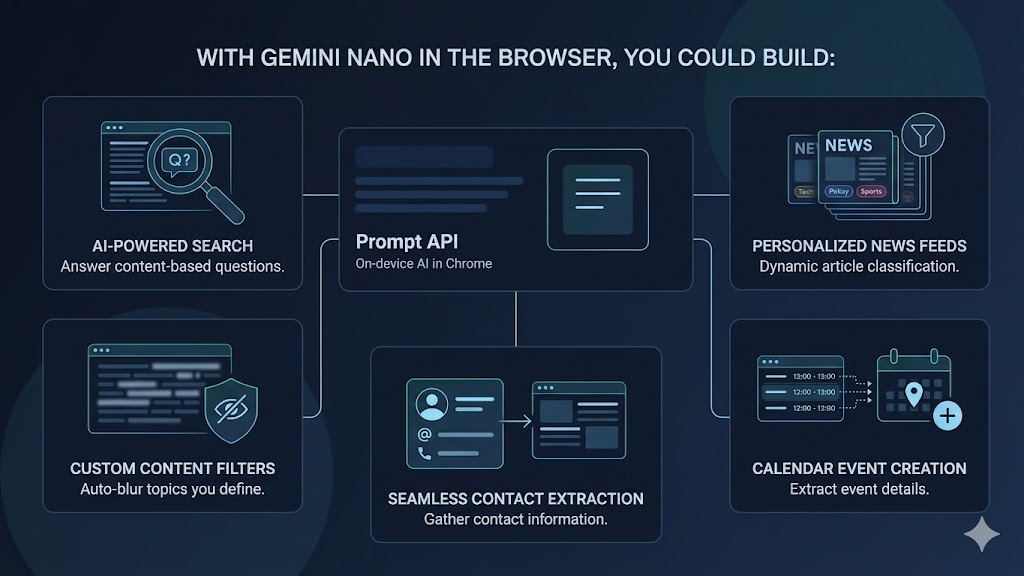
The strongest use cases are narrow, high-frequency tasks close to page context:
- Content tagging and topical filtering for feeds.
- Structured extraction from web pages inside extensions.
- Local draft assistance in writing workflows.
- Policy checks and moderation prefilters before server submit.
- Short-form summarization or rewrite helpers in productivity tools.
These tasks benefit from local execution and don’t require frontier-model depth on every request.
Where It Does Not Fit
Prompt API is a poor fit when your feature needs:
- Best-possible reasoning quality on complex workflows.
- Huge cross-document context windows.
- Shared memory or orchestration across many users.
- Deterministic enterprise policy enforcement with centralized logging.
In those cases, server-side models remain the primary engine. A hybrid architecture usually wins: local model for instant interaction and pre-processing, remote model for heavy reasoning and final decisions.
Extension Strategy: Why the Origin Trial Was Important
Google first opened the Prompt API for Chrome Extensions in an origin trial, giving extension developers early access and a feedback channel before broader stabilization.
That early trial period signaled two things:
- Google expects extension use cases to be a major adoption driver.
- API shape and constraints are still informed by live developer feedback.
If you’re building on top of these APIs, treat version behavior as moving parts. Keep compatibility layers thin and isolate browser-AI integration behind internal interfaces so you can adjust quickly.
UX and Trust Considerations
A local model still needs honest UX.
Users should know when a model download is happening, why a feature is unavailable, and what data stays on-device. The best implementations make these states visible instead of hiding them behind generic errors.
From a trust perspective, local inference can improve privacy posture, but only if your product messaging is precise and your telemetry design avoids accidental data leakage from prompts or outputs.
A Practical Rollout Plan
If you want to ship Prompt API features safely, use this staged approach:
- Start with one bounded task (for example, local classification).
- Add explicit capability checks and fallback to server endpoints.
- Instrument activation, download completion, and failure reasons.
- Roll out to a small cohort before broad enablement.
- Keep prompts short, targeted, and easy to audit.
Do this well and you get measurable UX gains without committing your whole AI surface area to one runtime model.
The Bigger Picture
Prompt API is part of a larger transition: browsers becoming AI-capable runtimes, not just document viewers.
For developers, that creates a new systems question: what should run on-device, what should run in the cloud, and how do you blend both without creating brittle user experiences?
Teams that answer that well will ship faster, spend less on avoidable inference calls, and deliver AI features that feel more responsive and private by default.