
Cloudflare cf: One CLI for an Entire API
Imagine asking an agent to deploy a Worker, inspect its logs, attach a database, protect the route with Access, and configure a WAF rule. The agent can write the application, but it still needs a dependable way to find and invoke five different parts of the platform. A tool with a few polished deployment commands leaves the rest of that work to API calls, browser automation, or guesswork.
Cloudflare’s new cf CLI attacks that mismatch at the interface. It is an open beta that exposes more than 3,000 Cloudflare API operations as commands, while Wrangler has accumulated roughly 280 command paths. Cloudflare reports that agents accounted for 48% of Wrangler usage in the week before the announcement, up from 25% in March 2026. The design starts from a practical observation: an agent needs discoverable operations and predictable data more than it needs a hand-crafted terminal table for every product.
That shift affects more than command count. cf also introduces command search, JSON-first output, a TypeScript configuration file for Workers, and Vite as the default development path. Together, these changes form a new workflow from intent to API call to reviewed configuration.
Why a broad CLI is hard
Wrangler grew around Workers. As Cloudflare added products, teams added their own commands and vocabulary. The same kind of lookup could become d1 info, hyperdrive get, or workflows describe. Each command can make sense in isolation, yet an automated client must learn all the differences. There is also a coverage ceiling: maintaining bespoke code for thousands of API operations is expensive, especially when many are rarely called from a terminal.
Cloudflare’s answer is to generate command coverage from the API descriptions it already maintains. Its Forge pipeline uses annotated OpenAPI schemas to generate SDKs, documentation, and now CLI commands from a common source. Product-specific metadata can improve a command without requiring each team to build a separate command framework.
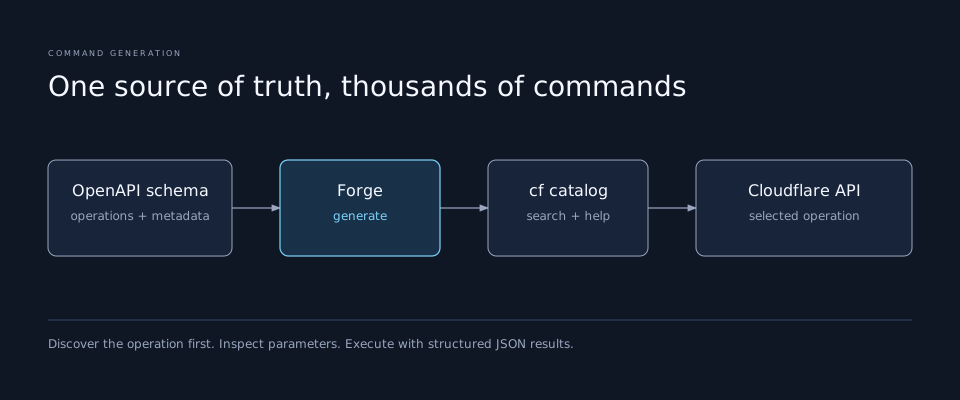
Generation solves coverage, but it does not by itself solve discovery. An agent cannot paste 3,000 command descriptions into every prompt. cf cli search searches a small index of API descriptions and parameters using a natural-language request, then returns likely commands. The CLI points agents toward this search when they first run --help. The useful pattern is narrow: search for the operation, inspect its help and required arguments, then execute it. A guessed command name is a poor substitute for that sequence.
JSON is the contract between commands
Terminal tables help humans scan a few rows. They are awkward for programs: columns move, values truncate, and decorative characters complicate parsing. Wrangler has --json on some commands, but the flag is not universal. cf makes JSON the default response format, pretty-printed for a person and condensed for an agent.
That changes how a multi-step operation can be composed. An agent can list resources, select a specific ID, pass it to another command, and retain the exact result as evidence. It can filter fields with jq without scraping a table. Human-readable forms still matter for operations that need personal judgment, such as choosing a domain. Cloudflare says cf can turn a complex API request into a validated form so a person can supply those inputs.
The key design choice is consistency. A command surface only becomes dependable automation infrastructure when success, failure, IDs, and parameter shapes can be handled predictably across products. JSON does not remove the need to check permissions or confirm a destructive operation. It makes the result inspectable before the next step.
Worker configuration becomes code with types
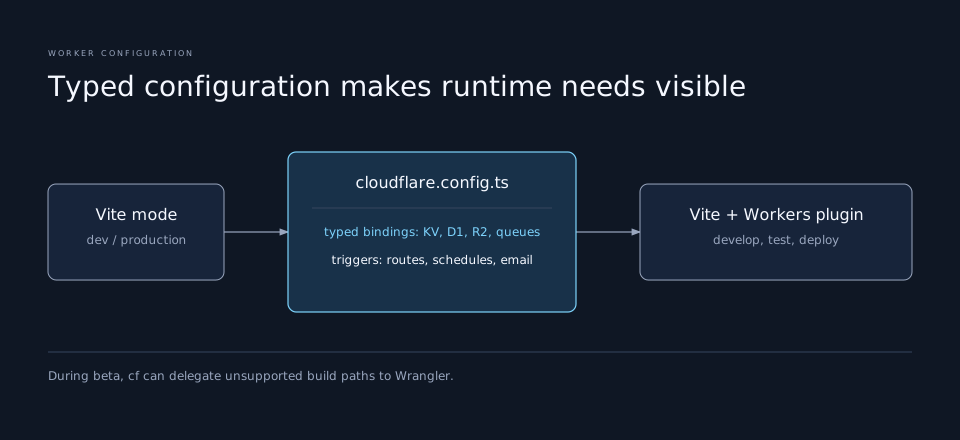
The second half of the launch is cloudflare.config.ts. It starts with Workers, although Cloudflare intends to expand it to other products later. A TypeScript file can expose a schema to an editor and language server, so an agent editing a binding gets completion and type feedback while it works. Wrangler’s TOML and JSONC formats could be validated, but they were less natural for programmatic reuse.
The configuration uses defineConfig from cf/config. A function can choose values from Vite’s mode, allowing development and production environments to share one base instead of copying large env blocks. Cloudflare reports that some internal configuration files shrank by 40% from more than 5,000 lines after applying this pattern. That is an internal example, not a promise that every project will shrink by the same amount.
Bindings are also declared through typed helpers. bindings.text, bindings.secret, bindings.kv, bindings.d1, bindings.r2, and bindings.queue express what a Worker expects in one discoverable place. A triggers helper brings fetch routes, schedules, queues, and email triggers into one list. This is useful to a human reviewer as well as an agent: the code describes the runtime dependencies and entry points near the application.
There is a boundary to keep in mind. A typed configuration can catch misspelled fields and guide edits; it cannot prove that an API token has the intended scope, that a live resource exists, or that a production route is safe to change. Review and deployment checks still need to cover those runtime facts.
Vite changes the local path
Wrangler built its own development and bundling experience before Vite existed. cf uses Vite by default for JavaScript Workers, including the Cloudflare Vite plugin. That brings the Worker into Vite’s development server, hot module replacement, plugin ecosystem, and build pipeline. Cloudflare recommends the Vite plugin alongside its Vitest plugin for local testing with Workers bindings and runtime APIs.
This is not an instant forced migration for every Worker. Some projects rely on Wrangler’s esbuild behavior, and Rust or Python Workers have different build requirements. During the beta, cf delegates development and deployment for those cases back to Wrangler. The cf migrate command converts existing Vite-based Workers to cloudflare.config.ts; other projects can adopt the CLI while retaining their current build path. Cloudflare says it plans one final major Wrangler release after the beta and 18 months of maintenance support after that point. That is a stated plan, so teams should check current migration guidance before scheduling a change.
For a new project, the announcement gives a short route: install with npm i -g cf, use cf init for a starter Worker, or run cf init/deploy to configure an existing project. A static site can start with cf deploy without a config file. The open-source repository is the place to check current commands and report beta issues.
A safe way to use it with an agent
The biggest opportunity is a workflow that discovers instead of memorizes. Give the agent a bounded goal and permission to inspect. It can search for commands, read their argument help, inspect existing resources, and propose the intended change. For a write, the important checkpoint is the exact account, zone, Worker, or resource ID and the parameters to be sent. After execution, structured output can confirm what changed.
That procedure matters because the new coverage includes high-impact operations. Cloudflare’s launch example spans deployment, observability, Access, domains, and WAF. A single CLI makes the path shorter; it also makes account selection, credential scope, and review of write operations more consequential. The practical rule is to use command discovery for breadth and explicit checks for authority.
The cf launch is therefore a useful case study in agent-facing developer tools. The large API surface is generated from a common source, commands are searchable on demand, outputs are structured by default, and configuration can be checked in the editor. Those pieces let an agent work across products without carrying the whole manual in context. The quality of the result still depends on selecting the right operation and verifying its effect.