Dynamic MCPs: Stop Hardcoding Your AI Agent's World
AI agents have traditionally been limited by a rigid constraint: their toolsets are hardcoded before deployment. If your agent needs a new capability, you modify code, redeploy, and hope you guessed right about future needs. Dynamic MCPs fundamentally change this paradigm by allowing agents to discover and configure tools in real-time based on actual task requirements.
The Hardcoding Problem
Traditional MCP (Model Context Protocol) implementations require developers to pre-configure every tool an agent might need:
// Traditional approach: Hardcoded tool configuration
const agent = new Agent({
  tools: [
    githubMCP,
    databaseMCP,
    slackMCP,
    fileSystemMCP,
    // What if you need something else tomorrow?
  ]
});
This creates several problems:
- Inflexibility: Agents carry unnecessary tools for most tasks
- Maintenance burden: Every new capability requires code changes
- Poor scalability: Tool libraries become bloated over time
- Context blindness: Agents can’t adapt to unexpected requirements
Enter Dynamic MCPs
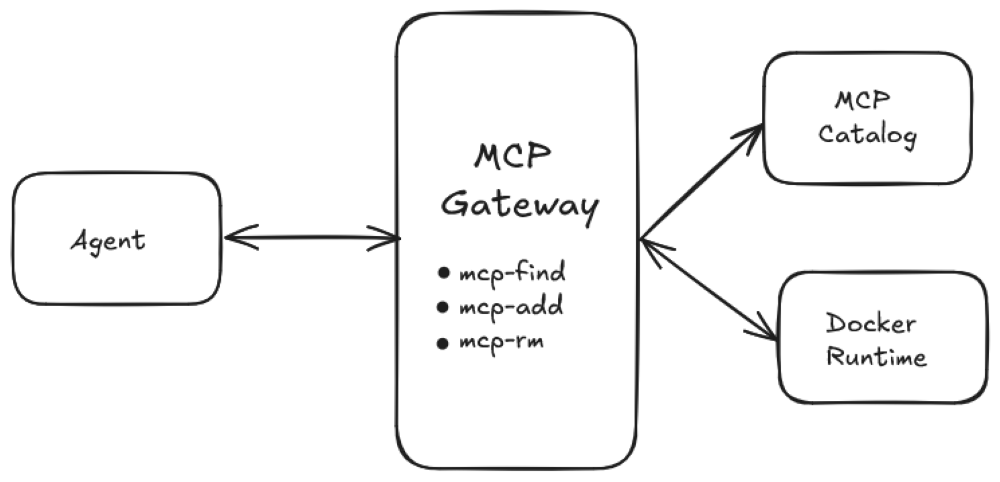
The Docker MCP Gateway introduces a revolutionary approach: agents that dynamically discover and configure their own tools. Rather than carrying a fixed toolset, agents reason about what they need and request it on-demand.
How It Works
The MCP Gateway exposes management tools that agents can use to discover and configure capabilities during conversation:
| Tool | Purpose |
|---|---|
mcp-find | Search the catalog for servers by name or description |
mcp-add | Add servers to the current session |
mcp-config-set | Configure server settings and parameters |
mcp-remove | Remove servers from the session |
mcp-exec | Execute tools from connected servers |
code-mode | Create custom JavaScript functions combining multiple tools |
The Adaptive Workflow
Here’s how a dynamic agent operates:
- Task Analysis: Agent receives a task and evaluates required capabilities
- Smart Search: Uses
mcp-findto discover relevant tools from the catalog - On-Demand Configuration: Calls
mcp-addto enable only needed servers - Execution: Performs the task using the newly configured tools
- Cleanup: Optionally removes tools when no longer needed
This workflow transforms agents from static programs into truly adaptive systems.
Real-World Example
Consider an agent asked to “analyze our GitHub repository’s recent issues and post a summary to Slack.”
Traditional approach (hardcoded):
- Agent always has GitHub, Slack, and analysis tools loaded
- Works for this task, but wastes resources on unrelated tasks
- Requires redeployment to add new integrations
Dynamic approach:
Agent: "I need GitHub API access and Slack integration for this task"
Agent: Uses mcp-find to search for "github" and "slack"
Agent: Calls mcp-add to enable github-mcp and slack-mcp
Agent: Completes task using the newly configured tools
Agent: Session-scoped tools automatically cleaned up
Key Benefits
1. Context-Aware Capability Loading
Agents load only what they need, when they need it. This dramatically reduces overhead and improves performance for specialized tasks.
2. Zero-Downtime Tool Addition
New integrations appear in the catalog and become immediately available to all agents without code changes or redeployment.
3. Composability with Code Mode
The code-mode tool enables agents to create custom JavaScript functions that combine multiple MCP servers, creating sophisticated workflows on-the-fly:
// Agent-generated code combining multiple MCPs
async function analyzeAndNotify() {
  const issues = await github.getIssues();
  const analysis = await ai.analyze(issues);
  await slack.postMessage(analysis);
}
4. Secure and Isolated
Despite the dynamic nature, security remains paramount:
- All MCP servers run in isolated Docker containers
- Servers are built and signed by Docker
- Code mode executes in a sandboxed JavaScript environment
- Gateway manages credential injection securely
Getting Started with Dynamic MCPs
Prerequisites
- Docker Desktop 4.50 or later
- MCP Toolkit enabled
- MCP-compatible LLM client (Claude Desktop, VS Code, or Claude Code)
Basic Setup
- Enable the MCP Gateway:
docker mcp feature enable dynamic-tools-
Connect Your Client: Configure your LLM client to connect to the MCP Gateway endpoint
-
Let Your Agent Discover: The agent can now use
mcp-findto discover available tools andmcp-addto enable them dynamically
Configuration Management
You can toggle dynamic features based on your workflow preferences:
# Disable if you prefer static configuration
docker mcp feature disable dynamic-tools

# Re-enable for dynamic discovery
docker mcp feature enable dynamic-tools
Important Considerations
Session Scope
Dynamically added servers are session-scoped. When you start a new conversation, previously added servers are not automatically included. This ensures clean state management and prevents tool bloat across sessions.
Experimental Status
Dynamic MCPs remain an experimental feature under active development. While production-ready, expect continued evolution and improvements based on community feedback.
When to Use Static Configuration
Dynamic discovery isn’t always the answer. Consider static configuration when:
- You have a well-defined, unchanging toolset
- Performance overhead of discovery is unacceptable
- You need guaranteed tool availability
- Compliance requires explicit tool declarations
The Architecture Shift
Dynamic MCPs represent a fundamental shift in how we think about AI agent architecture:
Before: “This agent always has these five tools”
After: “This agent can discover and configure whatever tools it needs”
This shift unlocks truly adaptive agents that respond to requirements rather than predictions about future needs.
Looking Forward
As the MCP ecosystem matures, dynamic discovery will become increasingly powerful:
- Growing Catalog: More third-party integrations appearing daily
- Smarter Search: Enhanced discovery based on semantic understanding of task requirements
- Advanced Composition: More sophisticated code-mode capabilities for complex workflows
- Community Contributions: Open contribution model accelerating ecosystem growth
Conclusion
Dynamic MCPs eliminate the artificial constraints of hardcoded tool configurations. By enabling agents to discover and configure capabilities on-demand, we’re building systems that are:
- More flexible: Adapting to unexpected requirements
- More efficient: Loading only necessary tools
- More maintainable: Adding capabilities without code changes
- More powerful: Combining tools in novel ways through code mode
The era of hardcoded agent toolsets is ending. The future belongs to agents that dynamically adapt their capabilities to match the tasks they encounter.
Ready to explore dynamic MCPs? Check out the Docker MCP Catalog and Toolkit to get started building truly adaptive AI agents.