JPEG XL in Chrome 155: A New Decoder and a Practical Path to Adoption
Chrome has announced that it is shipping JPEG XL decoding from Chrome 155. For people who publish images on the web, the important change is simple: a .jxl file can become a normal image source in Chrome. For browser engineers, the story is more involved. Chrome’s route to support ran through a new decoder written in Rust, work to make that decoder fast, and an effort to test the format consistently across browsers.
JPEG XL is not merely a smaller JPEG. It can encode photographic images with or without loss, preserve high dynamic range and wide color, carry transparency and animation, and progressively reveal an image as bytes arrive. It can also convert an existing JPEG into a JPEG XL file without losing the ability to reconstruct the original JPEG bytes. Those capabilities are useful in different settings, so the right deployment choice depends on the images you actually serve.
What Chrome is shipping
The Chrome team’s announcement says that decoding support begins with Chrome 155. This is a browser decoder milestone. A site can provide a JPEG XL image and Chrome can display it; the announcement does not mean that every image pipeline, editor, content management system, or browser now creates JPEG XL files automatically.
Chrome describes typical JPEG XL files as 30–50% smaller than JPEG at comparable quality. That is a claim about comparisons with JPEG, not a promise that every JPEG XL file beats every AVIF file. The team recommends testing both JPEG XL and AVIF, and expects JPEG XL to be especially useful for high-fidelity or lossless photographs and for cases that benefit from fine-grained progressive decoding.
The distinction matters because a web image format has two jobs. The encoder chooses how to represent a source image and how much work to spend compressing it. The decoder turns untrusted file bytes back into pixels, usually in a browser that serves millions of unrelated sites. Excellent compression alone cannot justify a new browser decoder if its security and speed are unacceptable.
Why the decoder changed the decision
Chrome’s new decoder is jxl-rs, a Rust implementation of JPEG XL developed alongside the format’s existing C++ reference implementation, libjxl. The project describes itself as a work in progress toward a conforming, safe, fast decoder. Chrome integrated it because decoding images from the network is a sensitive boundary: the browser must parse complex binary data supplied by sites it does not trust.
Rust does not make every decoder bug impossible. A decoder can still reject valid files, render the wrong pixels, consume too much memory, or have logic errors. It does, however, prevent broad classes of memory errors in safe code. Chrome says it tested the implementation with fuzzing and code review and found no memory safety bug during its development. That is a report of its experience, not a proof that no flaw can exist.
Performance was the other half of the bargain. Image decoding happens during page loading and scrolling, so a format can look attractive on a storage chart while feeling slow to the reader. Modern codecs depend heavily on SIMD instructions, which process groups of values at once. The Chrome team points to Rust’s SIMD feature support and the jxl_simd abstraction as steps that let the decoder use hardware acceleration while keeping unsafe code confined to a small, reviewed surface. The implementation also uses a pipeline for work crossing image-region boundaries and tries to avoid unnecessary copies.
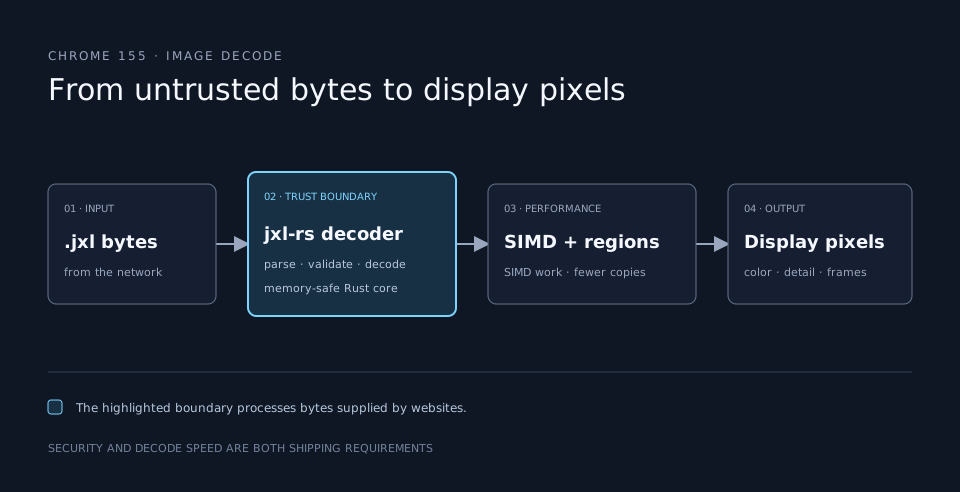
This is why the announcement is also a browser-engineering story. The format’s advantages had been known for years. A decoder that fits Chrome’s security and performance requirements made those advantages practical to ship.
The features behind the file extension
JPEG XL covers several image workflows that used to need different answers:
- Lossy photographs. An encoder can discard less visible detail to reduce transfer size. Compare the output visually at the sizes and displays your readers use.
- Lossless images. Pixel values can be preserved exactly, which matters for source assets, scientific imagery, and some editing pipelines.
- Existing JPEG collections. Lossless JPEG transcoding can put a JPEG into a JPEG XL representation and later recover the exact original JPEG file. This is different from decoding a JPEG and saving a newly compressed approximation of its pixels.
- Richer display. The format supports high bit depths, wide color, HDR, transparency, and animation. The file can retain information that an ordinary 8-bit JPEG cannot express.
- Progressive presentation. An image can become useful before its complete high-quality representation has arrived. A smaller transfer and an earlier recognizable preview solve related, but separate, user-experience problems.
The JPEG committee’s format overview and the libjxl reference implementation document these capabilities and provide cjxl and djxl tools for encoding and decoding. If you are migrating a JPEG archive, test the reversible transcoding path separately from ordinary lossy encoding. If you are publishing photographs, measure appearance, size, encode time, decode time, and cache behavior as a set.
Shipping a JPEG XL image on a real site
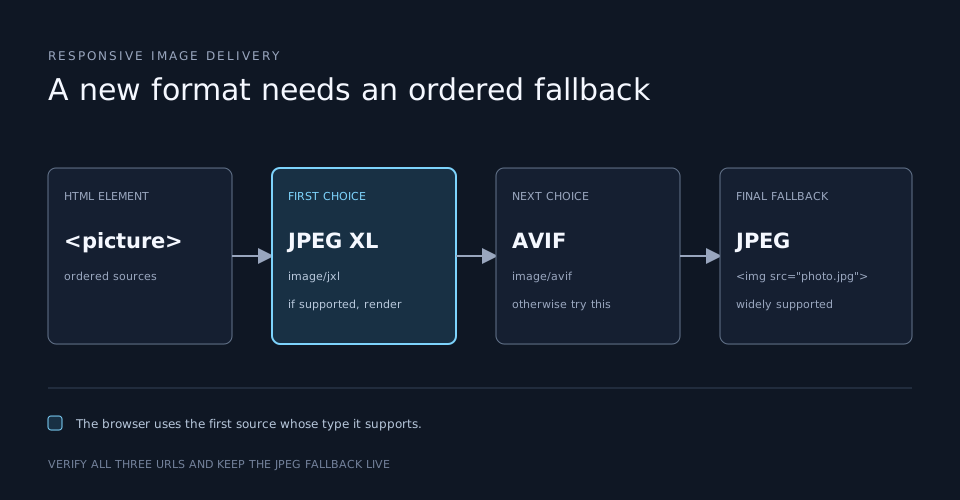
Browser support is a deployment question, not just a codec question. Chrome’s announcement makes JPEG XL a much more realistic candidate, but a site still needs a format that can render when JPEG XL is unavailable or its particular feature behaves differently. The HTML <picture> element lets the browser select a supported source before falling back to an ordinary <img>:
<picture>
  <source srcset="photo.jxl" type="image/jxl">
  <source srcset="photo.avif" type="image/avif">
  <img src="photo.jpg" alt="A mountain ridge at sunrise" width="1200" height="800">
</picture>
The first supported source wins. The JPEG remains a reliable final choice, and the explicit dimensions reserve layout space before the image loads. You could choose a different order after testing your own images; the example is a delivery pattern, not a universal ranking of codecs. Serve JPEG XL with the image/jxl media type, and make sure the fallback really exists at the advertised URL.
Keep the source files in a build or media pipeline that can reproduce them. For a small test, the reference encoder accepts commands such as cjxl input.png output.jxl; production settings need explicit quality and effort choices. Test on representative photographs, graphics, color profiles, and mobile devices rather than judging a single demo image. Keep the original or a lossless master if future re-encoding matters.
Interoperability is still active work
In Interop 2026, JPEG XL is an investigation effort. Its goal is to make browser behavior testable; the Interop team notes that existing web-platform tests were sparse and that questions such as progressive rendering need careful requirements. A browser being able to decode a file is only the first layer. Color handling, animation, high bit depth, and progressive display must also behave predictably across engines.
Chrome says it participated in that work and tested its implementation against the developing suite. This matters to site owners because a capability becomes much easier to deploy when a file can be expected to look and behave the same across browsers. It also keeps marketing claims separate from verifiable behavior. If your use case depends on HDR or animation, test those features directly instead of inferring support from a simple still photograph.
The arrival of JPEG XL in Chrome therefore opens a practical path, but it does not remove the work of measuring and validating your own image library. Start with an image class where its strengths are clear, generate an AVIF or JPEG alternative, compare total page behavior, and expand only when the results hold up. That is how a format announcement becomes a faster, more faithful image experience for actual readers.