
Microsoft Execution Containers Put Agent Permissions Outside the Agent
A coding agent asked to fix a website needs a working directory, a compiler, and probably Git. It does not need to rewrite the production deployment configuration simply because that looks like a shortcut. The crucial distinction is between what the agent decides to do and what the operating system allows it to do. A prompt can ask for restraint; a containment boundary can reject an attempted operation.
Microsoft Execution Containers (MXC) is Microsoft’s attempt to make that boundary a normal part of an agent integration. The application supplies a workload command and a policy describing its permitted resources. MXC selects a platform backend, starts the workload inside it, and applies the policy independently of the model and its generated code. Microsoft’s announcement describes MXC as generally available, while its public repository is the practical place to check the current SDK, host requirements, and backend behavior before deployment.
The policy belongs to the launcher
An agent can call tools, generate scripts, and load plugins. Any of those can make an unexpected file or network request. If the agent itself can relax its own restrictions, a malicious instruction or mistaken plan can turn the restriction into a suggestion. In MXC’s model, the host application defines the container request before launching the workload. The contained process can use the granted resources; it cannot simply edit the host’s request to give itself more.
The request covers more than a folder allowlist. It names the command, working directory, environment, timeout, and containment backend. It can grant read and write access to one directory, read-only access to another, and deny access to a third. It also describes outbound and inbound network access, host loopback, and desktop capabilities. An example coding task might grant writes to a checkout, reads to a deployment reference, and no access to personal documents. A network connection to a package registry would need an explicit decision rather than being inherited from the user’s browser session.
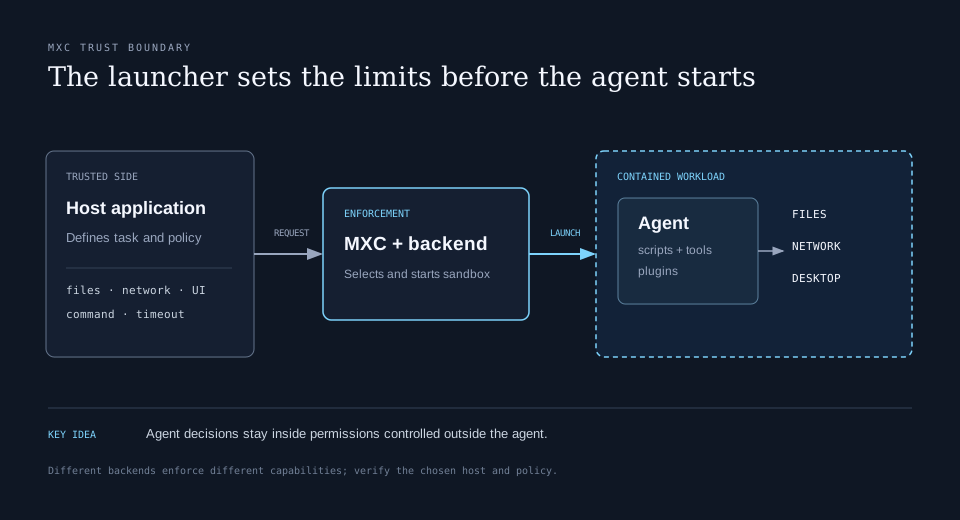
That separation has a useful failure mode. A tool that unexpectedly needs an ungranted file gets an access error. The developer can then decide whether the task truly requires the file, supply a narrow grant, or change the workflow. The answer should not be to grant the entire home directory for convenience.
One request, several kinds of container
MXC presents a common containment model across Windows, Linux, and macOS, but the backends do not offer identical isolation. Its repository’s backend table lists a Windows process container as the default on Windows 11, Bubblewrap on Linux, and Seatbelt on macOS. A process backend is a reasonable fit for quick tool executions where startup time matters. It uses the host operating system’s sandboxing facilities; it is not equivalent to putting the job in a separate virtual machine.
For longer Windows agent sessions, IsolationSession runs under a separate account and operating system session. That gives the agent a separate desktop, clipboard, input, and UI context from the interactive user. WSL Container (WSLc) is available for Linux toolchains on Windows. Microsoft also lists microVM choices for workloads that need a stronger virtualized boundary, with some backends marked experimental. The Windows Sandbox backend appears in the repository too. Availability depends on host version and installed components, so the selected backend and the exact capabilities it enforces need to be checked on the target machine.
The distinction matters because a policy field is only useful if the backend enforces it as expected. File path grants, network filtering, GUI access, and loopback behavior vary with platform and backend. The MXC schema documents these variations and says unsupported combinations may be rejected. The correct review question is not merely “does this JSON contain a deny rule?” It is “what does this backend do with the rule on this host?”
| Workload | Likely starting point | Main tradeoff |
|---|---|---|
| Short code or tool call | Process sandbox | Responsive, with host-specific controls |
| Agent using a separate Windows desktop | IsolationSession | Stronger user-session separation and lifecycle cost |
| Linux-first tools on Windows | WSLC | Linux compatibility and container setup |
| High-risk untrusted execution | Virtualized backend | More isolation, more startup and operational cost |
This is a selection guide, not a claim that every backend is interchangeable. Microsoft explicitly tells developers to evaluate the security properties of the backend used for each workload.
A concrete Node integration
The Node SDK exposes its public API from @microsoft/mxc-sdk/v1. The package documentation currently requires Node.js 24 or later, with newer patch versions needed for native standard-I/O transfer on Windows. A small run-to-completion request looks like this:
import { run, type ContainerRequest } from '@microsoft/mxc-sdk/v1';

const request: ContainerRequest = {
  command: 'node build.js',
  filesystem: {
    readonlyPaths: ['/work/reference'],
    readwritePaths: ['/work/site'],
  },
  network: { egress: { default: 'deny' } },
  timeoutMs: 30_000,
};

const result = await run(request);
console.log(result.exitCode, result.stdout);
Those paths illustrate the policy shape; real paths and support must be chosen for the host and backend. A build may also need access to the Node executable, libraries, temporary storage, and package cache. The SDK’s run call returns captured output and an exit result. spawn supports streaming output, while the lifecycle API can provision, start, execute in, stop, and deprovision a persistent container. Persistent sessions are useful for agents that need state across multiple tool calls, but they also lengthen the period during which granted resources remain reachable.
The SDK can report available backends and capabilities. That is helpful for setup, but the documentation calls discovery advisory: a backend can appear in the list yet reject a particular launch request. Validate the actual request and handle launch errors as normal product behavior.
Discover the permissions a workload actually uses
Least privilege is easy to state and hard to author for a real development toolchain. Compilers read libraries; package managers check caches; editors probe configuration folders. Microsoft’s announcement describes three operating modes for Windows process containers: Enforcement blocks ungranted access; Learning blocks it and records an activity report; Permissive records access that the policy would deny while allowing the operation. Those modes are an authoring workflow, not three equally safe production settings.
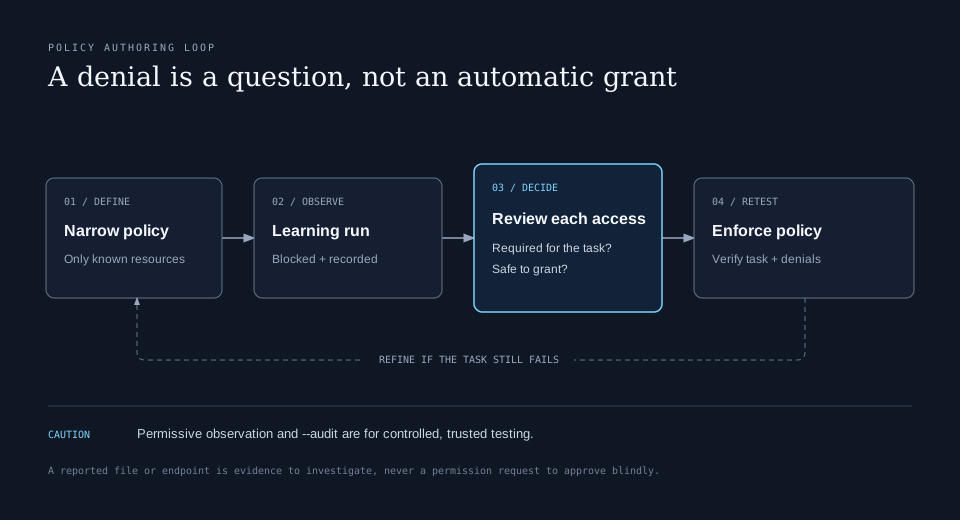
The current repository also documents native diagnostic and audit commands. Its README warns that --audit turns off sandbox security for the workload being analyzed and must not be used to execute untrusted code. That caveat is easy to miss if “audit” sounds like a safe production setting. Use deny-and-record diagnostics when they meet the need; reserve permissive observation for trusted test workloads and controlled environments.
After each run, investigate the attempted resource: was it required to complete the task, an optional convenience, or an unexpected side effect? A package installer trying to reach a public registry may deserve a tightly scoped egress route. A plugin trying to read an SSH key should not receive one just because it appears in an activity report. Repeat the run after each policy change, then test the resulting behavior in enforcement mode.
Organization policy and agent identity
Developer-defined workload permissions are only one layer. Microsoft’s announcement says organizations will be able to apply additional MXC constraints through Intune on Windows 11 process containers. An agent integration therefore has to cope with a policy narrower than the developer expected. If a task cannot finish within that boundary, the application should explain what operation was denied and ask for an appropriate human or administrator action. Silent retries through another tool would defeat the point of a managed boundary.
Microsoft also plans to distinguish agent activity from user activity through Entra and Agent 365. That is a separate question from containment. The container controls what the workload can reach; identity and attribution help determine which agent did something and let administrators investigate or constrain that agent without treating every action as the employee’s own. The announcement describes these identity and management integrations as coming later, so they should not be assumed to exist in every MXC deployment today.
What to verify before relying on it
MXC makes the permission boundary explicit, but it cannot choose a safe policy for an application automatically. A production integration should verify the backend on each supported host, test file and network denials, keep credentials outside broad grants, set bounded execution time, and decide how a denied action is surfaced to the user. It should also test the behavior of child processes and tools, because those are exactly the operations an agent tends to launch.
There are important platform limits. The schema documentation specifies backend-specific working-directory and environment behavior, and Windows file denial can use different mechanisms depending on the containment tier. Some backends are experimental. The public SDK examples are a starting point for integration, not proof that a particular app’s full workflow is contained as intended.
The central design is valuable: the agent can be capable inside a sharply defined workspace without receiving all the authority of the signed-in person. The engineering work is in defining that workspace, choosing an appropriate backend, and treating every requested expansion of access as a deliberate decision.