
The Request Path Behind Netlify's Faster Edge Functions
An edge function sits directly in a website’s request path. It can choose a route, check authorization, or tailor a response before the page reaches the visitor. That position makes small infrastructure costs visible: every extra trip and every slow startup delays the response. Netlify’s engineering account describes a migration from a hosted V8-isolate service to Firecracker microVMs running inside Netlify’s edge network. The interesting part is how many decisions must line up for a virtual machine to be the faster option.
Netlify reports roughly one billion Edge Function executions per day. On its new platform, a warm invocation’s overhead—routing to compute, entering the microVM, running the function, and producing response headers—is about 5–6 ms at the median, versus 25–40 ms previously. It also reports a 47.4% improvement at p99, 99.998% availability, and logs arriving about five times faster. Those are production figures supplied by Netlify, not independent benchmarks, and the comparison is of complete serving paths rather than an isolate and a VM in isolation. The previous path sent matching requests to an external execution provider; the new path stays within Netlify’s network. That removed network and control-plane work is central to the result.
A request becomes a placement decision
The request first reaches a nearby edge node. That node terminates TLS and checks the path against the deploy’s Edge Function routes. If no route matches, normal cache and origin handling continues. If one does, the edge node prepares a machine specification and sends the request to compute capacity in the region. The specification identifies three images: the JavaScript runtime, Netlify’s platform layer, and the customer’s function bundle. It also sets CPU, memory, and connection limits.
The edge node computes a service identity from the specification hash and site-specific data. A new deployment or a different environment configuration therefore becomes a different service. This matters for both correctness and isolation: code from two deployments should not accidentally share a running machine, and an untrusted function should not reach another customer’s execution environment. A microVM provides a hardware virtualization boundary around each function service; it does not, by itself, prove the entire platform secure. The host, control plane, image supply chain, and network policy still matter.
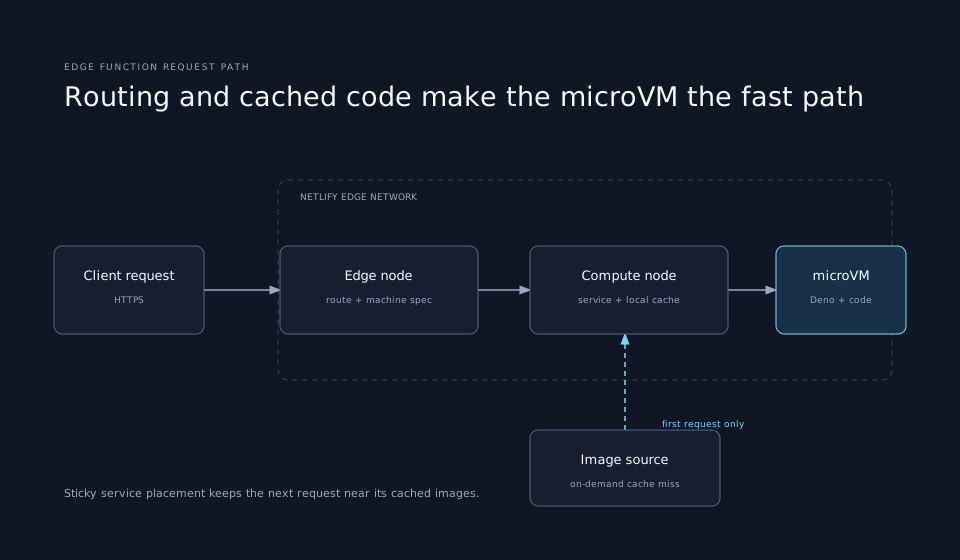
Each region has several compute nodes. Netlify uses rendezvous hashing to steer a given service toward the same node. Repeated requests are likely to find the service’s code cached and a ready execution path, reducing needless cold starts. Pure stickiness has a cost: one popular service can saturate its assigned node and harm its neighbors. When traffic crosses a threshold, Netlify spreads that service across a slice of nodes. That trades some cache locality for capacity and keeps a single hot workload from pinning a whole region. The placement policy is part of the latency story, not just a load-balancer detail.
A first request pays for the image
A compute node receiving the request looks for an existing service ID. If the service is absent, it creates one and checks whether the requested images are already on disk. Missing images are fetched from the edge node. Later requests reuse the local copies. This means a new deploy does not need to push every customer’s code to every region in advance. A region downloads the images it actually needs, when traffic arrives there.
Netlify says this image-fetching cold path occurs on about 1.2% of invocations and takes about 9 ms on average. Those figures describe its observed workload; they do not promise that every first request will finish in nine milliseconds. The image may already be cached on some nodes, and the total user response time still includes the function’s own work and any origin or network calls it makes. At a billion daily invocations, even a small cold fraction is operationally substantial, so caching and placement need to work under real traffic rather than only in a benchmark.
The three-image split has another operational advantage. Netlify can update the runtime or platform layer separately from each customer’s code. The spec carried with a request says exactly which combination should run. The service ID then makes a changed combination distinct from the previous one. This is a useful deployment property: an old function cannot silently turn into a new version merely because a file was replaced under a warm process.
What starts inside the microVM
Netlify says a microVM can be created in under a millisecond and started in about 2 ms at p99. It uses a minimal Linux environment rather than booting a general-purpose operating system. The customer files are mounted as an uncompressed EROFS image and memory-mapped. The VM can read the needed pages as execution reaches them rather than copying the whole bundle into memory at launch.
Once the JavaScript server has booted and opened its port, the platform takes a snapshot. Idle microVMs can scale to zero; a later invocation restores a machine from the snapshot. The snapshot is also memory-mapped, so resuming does not require eagerly reading its full contents. Unikraft, which collaborated on the platform, describes additional work around on-demand image resolution and VM lifecycle. Together, small boot images, lazy file access, snapshots, and placement make VM startup fit an edge request budget. A tiny VM with a slow image-distribution system would not produce the same result.
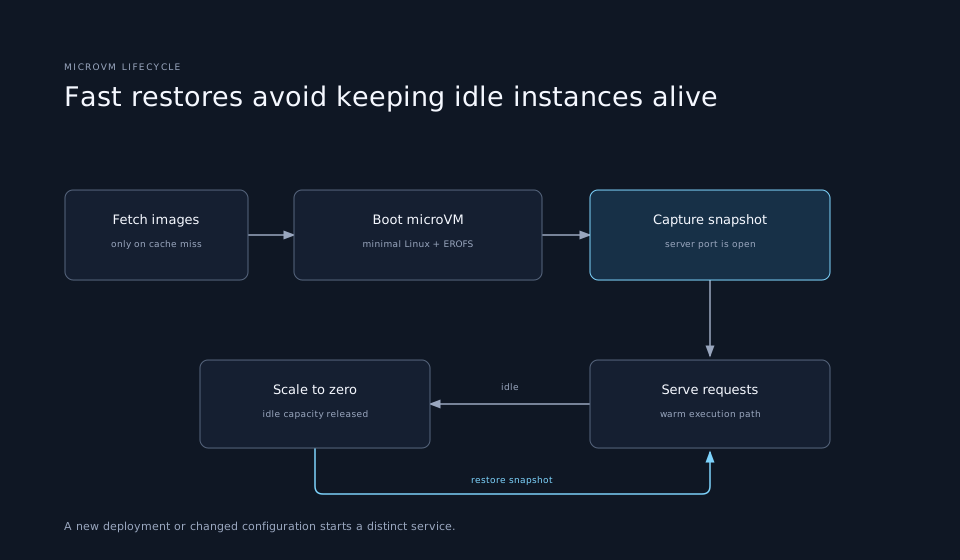
The platform does not keep a microVM alive indefinitely. Netlify caps how many requests one instance handles and starts another in anticipation of retirement. That keeps long-lived process drift bounded while maintaining warm capacity. On the compute node, local DNS resolvers remove another avoidable hop. Metrics separate boot time, first port open, and user-code start so the team can see where delay occurs. Circuit breakers reroute traffic and decommission unhealthy nodes. These details matter because a six-millisecond median is not enough if a failure leaves requests stranded or tail latency grows unchecked.
Reliability requires a separate control plane
Edge and compute nodes have different jobs. Edge nodes handle incoming traffic and route matching; compute nodes run customer code. Netlify builds them separately, allowing each fleet to use suitable machine types and scale independently. A control plane tracks healthy compute nodes and publishes that list to edge nodes. For a rollout, a new compute fleet comes up alongside the old one, reaches the desired size, and takes traffic only after health checks pass. The same separation makes rollback possible without asking every request handler to change in place.
The system also changed the operational loop for developers. Unikraft reports median log delivery falling from about 2.5 seconds to 500 ms, including Netlify’s enrichment pipeline. That is distinct from request latency, but it shortens the time between a deploy behaving badly and a developer seeing evidence. Netlify says the migration is already live, at the same pricing, with no project changes required. Existing Edge Function declarations, URL imports, npm packages, Node built-ins, and local development continue to work as before.
A new foundation, with current limits still in place
Running a full VM and owning the runtime gives Netlify room to change what Edge Functions can support. Its team points to broader npm compatibility, revisiting old execution limits, and features that depend on controlling the network path. Those are possibilities, not all shipped changes. Current Netlify documentation still lists a 50 ms CPU budget per request, 512 MB per set of deployed Edge Functions, and a 20 MB compressed code limit. The API documentation still describes npm package support as beta and notes caveats for native binaries and runtime file imports. A physical filesystem inside a microVM can remove a technical obstacle, but product support and documented limits change on their own schedule.
There is a broader systems lesson in the migration. The unit to optimize is the complete request path. Isolation technology matters, but so do placement, image distribution, snapshots, cache locality, telemetry, and safe fleet rollout. Netlify made microVMs work at edge speed by changing all of those pieces together. The headline improvement is credible as a measured platform result; it should not be read as a general claim that VMs are always faster than isolates.