Parallel Coding Agents with tmux and Markdown Specs: A Real-World Operating System
The Core Model: Roles Plus a Written Spec Contract
The workflow runs multiple “vanilla” coding agents in parallel, each with a clear role:
- Planner: designs a feature or fix in detail.
- Worker: implements from an approved design.
- PM: handles backlog grooming and idea intake.
The contract between those roles is a Markdown document called a Feature Design (FD). An FD is not a casual note. It contains:
- the exact problem statement,
- alternative solutions considered (with pros/cons),
- the final chosen approach,
- implementation file targets,
- verification steps.
That spec-first discipline is what makes concurrency tractable. Without it, every parallel agent session starts drifting into guesswork.
Feature Designs as a State Machine
Every FD is tracked with an ID such as FD-001, FD-002, and so on, usually under docs/features/. The process uses explicit lifecycle states:
PlannedDesignOpenIn ProgressPending VerificationCompleteDeferredClosed
This is effectively a local issue tracker designed for agent-first development. Instead of relying on chat history, the FD index becomes the canonical planning surface for both humans and agents.
A strict naming pattern also keeps implementation tied to design history. Example commit style: FD-049: Implement incremental index rebuild.
The Six Commands that Drive the System
The original setup uses six commands as lifecycle primitives:
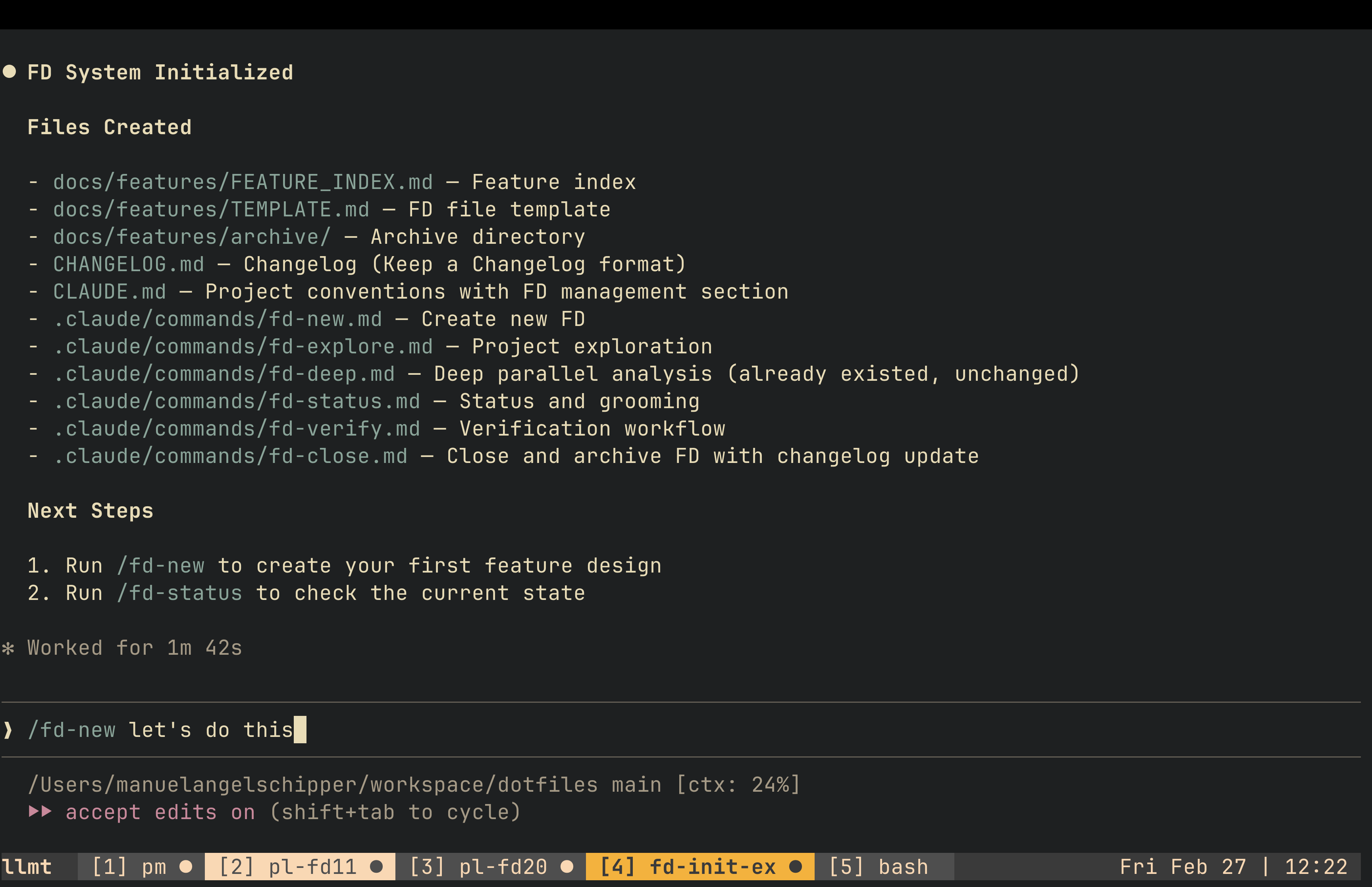
/fd-new: convert rough idea dumps into a structured FD./fd-status: show active work, pending verification, and completed items./fd-explore: load architectural context, docs, and prior specs before planning./fd-deep: launch multiple planning agents in parallel for hard design problems./fd-verify: run a proofread plus verification pass and commit current state./fd-close: archive FD, update index, and update changelog.
Together these commands convert ad hoc prompting into a reusable engineering loop. The key is that each command maps to a concrete state transition, so parallel sessions do not lose operational coherence.
Bootstrapping the Workflow into Any Repository
To avoid rebuilding this manually per project, the author created /fd-init to scaffold the same operating model in a new codebase. The bootstrap flow typically:
- infers project context from repository signals,
- creates feature-design directories and templates,
- installs lifecycle commands,
- appends project conventions for FD management.
The important part is not the script itself; it is the standardization. Once the same primitives exist in each repo, switching projects does not require relearning the process.
Planning in Depth: Why the Planner Role Matters Most
The post emphasizes that quality is won or lost during planning. Planners start with /fd-explore so they ingest existing architecture, docs, and prior decisions before producing proposals.
Two interaction styles are combined:
- conversational design iterations in chat,
- inline annotations directly in the FD file.
For inline feedback, notes are inserted with a marker like %% next to uncertain assumptions or missing analysis. Then the agent is asked to process those exact annotations. This reduces ambiguity compared with long conversational corrections.
For complex features with unclear paths, the workflow escalates to /fd-deep: multiple planning agents explore different angles in parallel (algorithmic, structural, rollout risk, operational concerns), and outputs are compared before picking a final design.
The practical reason for this is context-window decay. Long planning sessions can cross compaction boundaries, and important design rationale may disappear. Explicit FD checkpoints preserve the decision trail.
Worker Execution: Fresh Context, Narrow Scope
Once an FD is marked ready (Open), implementation is handed to a fresh Worker session in a separate tmux window.
Typical execution pattern:
- point Worker to the FD,
- run a plan pass first,
- allow edits only after line-level steps look correct,
- keep commits atomic against the FD ID.
For larger blast-radius work, separate git worktrees are used to isolate changes and reduce cross-feature interference.
This split between planner and worker sessions is deliberate: implementation context stays focused when the design is already concrete.
Verification Is Not Optional
Each FD includes verification steps, but the author noticed repeated manual prompting was still needed to force deep self-review. That prompted creation of /fd-verify, which bundles:
- commit snapshot,
- proofread pass,
- runtime verification plan.
In mature projects, this can include specialized test commands that run against live-like data, collect diagnostics, and output structured Markdown evidence (tables, timestamps, observed anomalies). The idea is to finish a feature with verifiable confidence, not just static correctness.
The Full Development Loop
The workflow cycles through three windows:
- PM window: pick or create the next FD.
- Planner window: design and refine until the FD is implementation-ready.
- Worker window: execute, verify, and close.
Then repeat.
The loop is simple enough to sustain, but rigid enough to keep multiple agents aligned. This is why it scales to several concurrent sessions without collapsing into prompt chaos.
Why 300+ FD Files Become a Strategic Asset
An unexpected outcome in the original project was the creation of a large corpus of past FDs. This historical trail improves future work in two ways:
- agents rediscover related prior decisions during exploration,
- humans recover forgotten rationale during high context switching.
In other words, FD files stop being temporary planning artifacts and become long-term organizational memory.
CLAUDE.md Was Not Enough: Introducing a Dev Guide Layer
A single giant instruction file eventually became too noisy. The solution was splitting durable coding principles into a docs/dev_guide/ structure, while keeping core session conventions in CLAUDE.md.
Examples of rules moved to a guide layer:
- fail fast on configuration errors,
- avoid duplicate helper logic,
- enforce structured logging rules,
- define safe deployment behavior,
- standardize robust LLM JSON parsing strategies.
This pattern improves signal-to-noise in session context: lightweight defaults up front, deeper policy lookup when needed.
Daily Interface: Cursor + Two tmux Terminals
The physical setup described in the source article uses three panes on an ultrawide display:
- IDE for reading/editing and cross-model checks,
- two terminals running tmux sessions for agent concurrency.
tmux navigation stays mostly standard (Ctrl-b workflows), with a few quality-of-life enhancements:
- fast reordering/moving windows,
- automatic window renumbering,
- role-based tab naming.
Path aliases (gapi, gpipeline, etc.) reduce prompt friction and can be interpreted by agents directly, which speeds up multi-repo navigation.
Idle-Signal Telemetry for Multi-Agent Work
When running multiple agents, the main bottleneck becomes attention routing: knowing which agent needs input next.
The source setup solves this with a two-layer signal chain:
- agent emits an idle/bell notification,
- tmux monitors bells and visually marks windows.
Window color changes then act as a lightweight scheduler for human intervention. This is a small but high-leverage operational detail that prevents polling each tab manually.
Hard Limits and Failure Modes
The original article is explicit about what breaks.
1. Cognitive Load Ceiling
Past roughly eight active agents, quality and decision continuity degrade. The issue is not compute; it is human review bandwidth.
2. False Parallelism
Not every feature can be parallelized safely. Forcing concurrency across sequential dependencies can create merge churn and reconciliation overhead larger than the speed gain.
3. Context Window Loss
Deep planning consumes context quickly. Compaction may drop critical rationale, so checkpointing FD progress becomes mandatory overhead.
4. Permission-System Safety Gaps
The article points out practical risk in command permission policies where allow/deny logic can be bypassed through alternate command forms. Mitigation used in practice: stricter deny lists for destructive operations plus explicit behavioral rules.
5. Human Translation Bottleneck
Business context still requires manual conversion into engineering-grade FDs. The tooling accelerates execution, but product-to-spec translation remains a human-heavy step.
Why This Workflow Resonated on Hacker News
The post landed because it addresses a real pain point in 2026: coding agents are powerful, but unmanaged parallelism produces low-trust output. This system offers a middle path:
- no heavyweight orchestration platform,
- no opaque autonomous pipeline,
- just explicit design artifacts plus disciplined execution loops.
It is simultaneously lightweight and opinionated, which is exactly what many teams need right now.
Practical Adoption Checklist
If you want to trial this approach in your own repository, start with a minimal version:
- Create
docs/features/FEATURE_INDEX.mdand a single FD template. - Require every non-trivial change to reference an FD ID.
- Split sessions into Planner and Worker roles.
- Add a verification command or checklist and enforce it.
- Add idle signaling in tmux so parallel sessions remain observable.
Run this for one week before adding more automation. The discipline is more important than the tooling volume.
Closing
The key contribution of this article is not “run more agents.” It is: make decisions explicit, then parallelize execution against those decisions.
Feature Designs, lifecycle states, and tmux observability turn agent concurrency from a novelty into an operating model. Even if you never run eight sessions at once, the spec-first pattern and verification discipline are immediately transferable to any serious AI-assisted codebase.