The Bash Script Hidden on a Uniqlo T-Shirt
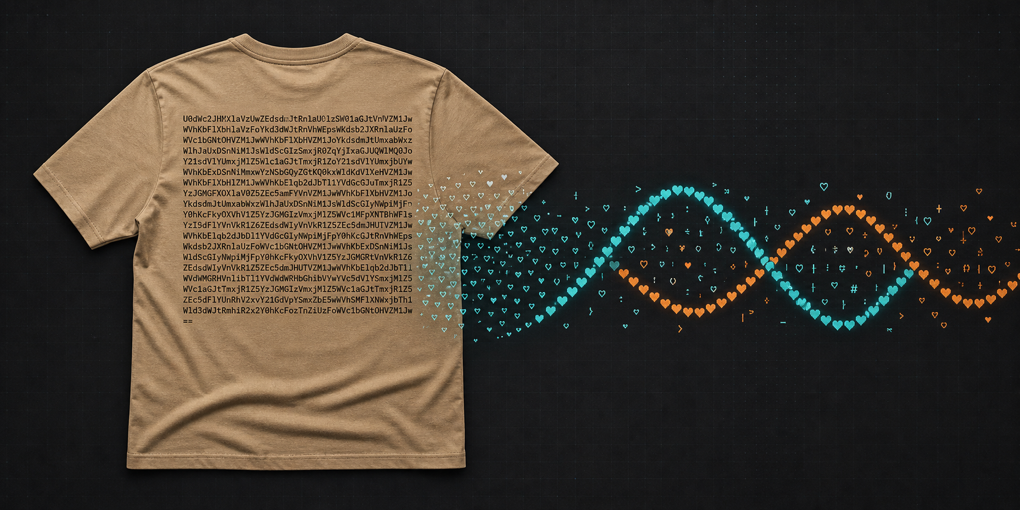
A tan T-shirt, a heart inside curly braces, and hundreds of characters that look like encoded noise: it is an unusually effective way to make a programmer stop in the middle of a clothing store.
The shirt comes from Akamai’s contribution to Uniqlo’s PEACE FOR ALL collection. Its back is not merely decorated to resemble code. It carries a real Bash program, encoded as one long Base64 string and wrapped in a command that decodes and executes it. Recovering that program turns a piece of graphic design into a small reverse-engineering exercise.
The result is harmless and cheerful. The route to that result, however, passes through several ideas worth understanding: recognizing shell syntax in an unfamiliar setting, reconstructing text when one wrong character can corrupt the payload, separating decoding from execution, and reading a terminal animation one primitive at a time.
The clue at the top of the print
The first useful detail is the beginning of the block:
#!/bin/bashThat is a shebang. On an executable text file, it tells the operating system which interpreter should run the file. Seeing one printed above an opaque alphanumeric block changes the question from “is this decorative texture?” to “what program is this trying to run?”
The wrapper around the long string contains three important pieces:
eval "$(base64 --decode <<< "...")"Read from the inside out:
<<<is a Bash here string. It sends the quoted text to a command through standard input.base64 --decodeturns the printable Base64 data back into its original bytes.$(...)captures the decoded output.evalasks the current shell to parse that output as a command and execute it.
The construction is compact, but it deserves suspicion. Base64 is an encoding, not encryption, and it says nothing about whether the hidden content is safe. An eval wrapped around concealed text is common in installers, copy-pasted one-liners, and malicious payloads for the same reason: the reader cannot easily inspect the program before it runs.
On the shirt, opacity is the puzzle. In a production terminal, opacity is a reason to stop.
Recovering the payload without trusting it
For Tris Sherliker, who documented the decoding process, the hard part was not recognizing Base64. It was transcribing the print exactly.
Base64 maps binary data into a restricted alphabet of letters, digits, +, and /, usually ending with = padding. That makes it printable, but not resistant to transcription errors. A photograph adds fabric folds, lighting, perspective, and ink texture. The shirt also uses a dense type treatment in which characters such as I, l, 1, O, and 0 are easy to confuse.
Sherliker combined Android’s built-in OCR, Tesseract, and Claude. Generalized into a practical recovery method, the approach is redundancy:
- Run more than one OCR engine.
- Keep the outputs separate.
- Diff them to find disagreement instead of trusting the most confident-looking result.
- Check the ambiguous characters against the image at high magnification.
- Decode to a file and inspect it as text.
- Never preserve the
evalstep while investigating.
A safe first pass looks like this:
base64 --decode < payload.txt > decoded.shThen inspect decoded.sh in an editor. If execution is eventually necessary, do it only after understanding the script and preferably in an isolated environment. For this artifact, execution is not required to learn what it does.
Sherliker’s final transcription had useful structural clues. The Base64 padding was present, the shell wrapper was balanced, and a successful decode produced readable Bash rather than random bytes. Those checks do not prove that every character is right, but together they make accidental corruption much less likely.
What the decoded program contains
Once decoded, the intimidating wall of characters becomes a commented Bash loop. Its message is repeated in English and Japanese, followed by the text it will animate:
text="♥PEACE♥FOR♥ALL♥PEACE♥FOR♥ALL♥..."The program asks the terminal for its current dimensions:
cols=$(tput cols)
lines=$(tput lines)
tput provides a portable interface to capabilities described by the terminal database. Rather than hard-coding a particular escape sequence or assuming an 80-column display, the script can query the active terminal and position output relative to its size.
It then hides the cursor:
tput civisAnimations look cleaner without a cursor blinking through them. Hiding it creates another responsibility, though: the program must restore it before exiting. The script installs a signal handler for Ctrl+C:
trap "tput cnorm; exit" SIGINTWhen the user interrupts the infinite loop, tput cnorm makes the cursor visible again. This tiny cleanup detail is the difference between a playful demo and one that leaves the terminal in an annoying state.
Drawing a wave with shell arithmetic
The animation advances a counter named t forever. On each iteration it selects one character from the message:
char="${text:t % text_length:1}"The modulo operation wraps the index back to the beginning when it reaches the end, so the phrase repeats continuously.
Next, the script turns the counter into an angle and asks bc -l to calculate its sine. Bash only has integer arithmetic; bc supplies the floating-point math:
angle=$(echo "($t) * $freq" | bc -l)
sine_value=$(echo "s($angle)" | bc -l)
The sine value moves smoothly between -1 and 1. Scaling it by one quarter of the terminal width and adding half the width produces an x coordinate centered on the screen:
x = center + amplitude × sin(angle)The code rounds that position, clamps it to the terminal boundaries, and calls tput cup to move the cursor to row t and column x. Each loop advances downward while the horizontal position oscillates, turning the repeated message into a sine wave.
Color changes at the same time. The script cycles through values between cyan and orange in the terminal’s 256-color palette, emits one character, resets the color, and adds a line feed. The complete effect is a flowing ribbon of hearts and the phrase PEACE FOR ALL.
This is not the most efficient way to build terminal graphics. Each frame starts several processes—echo, bc, and tput—and the row counter grows without reference to the current screen height. But efficiency is not the point. The program is short, readable after decoding, and assembled from commands likely to feel familiar to a Linux user.
The code is part of the design
Akamai described the light tan color as a reference to the beige computers of the early internet. The heart on the front represents the internet used for good, while the code on the back connects the design to Linux and the open-source systems beneath online services.
There is a technical imprecision in calling Linux a language—it is a kernel, while Bash is the language visible here—but the design works because it operates at several distances. Across a room, the code is texture. Up close, the shebang rewards recognition. With a camera and some patience, the encoded block becomes an executable message.
That layered reveal is stronger than printing a plain slogan. The wearer carries the message, but the curious reader has to participate in uncovering it.
The typography adds one final twist. The block uses Roboto Mono, yet spacing and optical treatment can make nominally monospaced characters difficult for OCR to segment. That is ideal for graphic texture and inconvenient for exact data recovery. It also explains why comparing multiple OCR results was more dependable than assuming a single modern vision model would produce a perfect transcription.
A useful rule for every encoded one-liner
The shirt’s payload is benign. The wrapper is still a perfect example of a command that should not be executed on faith.
When an unfamiliar one-liner decodes text and sends it directly into eval, bash, sh, PowerShell, Python, or another interpreter, split the pipeline:
- Save the encoded input.
- Decode it without execution.
- Read the output.
- Identify network access, file writes, privilege changes, and persistence.
- Verify where it came from.
- Run it only if the behavior and environment are acceptable.
That habit applies whether the code arrives in a shell prompt, an installation guide, a QR code, or on the back of a T-shirt.
Here, careful inspection ends with a colored wave and a message of peace. More importantly, it demonstrates the right order of operations: curiosity first, execution last.